

As digital transformation accelerates, accessibility is crucial for creating inclusive online experiences that reach all users. While innovation continues to enhance sectors from fintech to healthcare, the question of inclusivity remains at the forefront: Are these advancements accessible to everyone, including individuals with disabilities?
Accessibility should not be an afterthought; it’s a core component of User Experience (UX) and essential to successful digital strategies. By embracing accessibility in technology design, organizations unlock new potential for their users, enhance brand reputation, and reduce the risk of compliance-related setbacks. Dive into the blog to learn how businesses can lead the way in accessibility through advanced, technology-driven approaches.
The Technological Imperative of Web Accessibility
Web accessibility ensures that people with disabilities can access, navigate, and engage with digital content effortlessly. Disabilities span auditory, cognitive, neurological, physical, speech, and visual domains, affecting billions of people worldwide. To create an inclusive digital presence, businesses must implement accessibility guidelines that foster meaningful, usable experiences.
The principles of accessibility — Perceivable, Operable, Understandable, and Robust (POUR) — provide a roadmap for creating experiences that are both accessible and scalable.
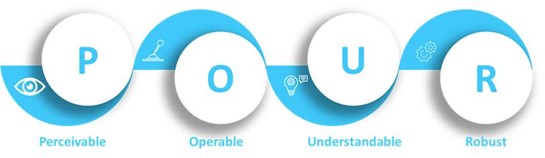
Technology, when applied thoughtfully, can bring these principles to life:
- Perceivable: Ensure that users can experience content through various senses (e.g., text alternatives for images, captions for videos).
- Operable: Provide flexible navigation options, allowing users to interact via keyboard, screen readers, or other assistive devices.
- Understandable: Simplify content and interactions for easy comprehension, minimizing complex language or interfaces.
- Robust: Build content compatible with various devices and assistive technologies to future-proof accessibility.
Integrating Accessibility into UX and Development Workflows
Integrating accessibility into UX and development workflows ensures that digital experiences are inclusive and usable for everyone. By embedding accessibility principles from the start, teams can design interfaces that cater to diverse needs. This proactive approach enhances user satisfaction, supports compliance, and broadens reach.
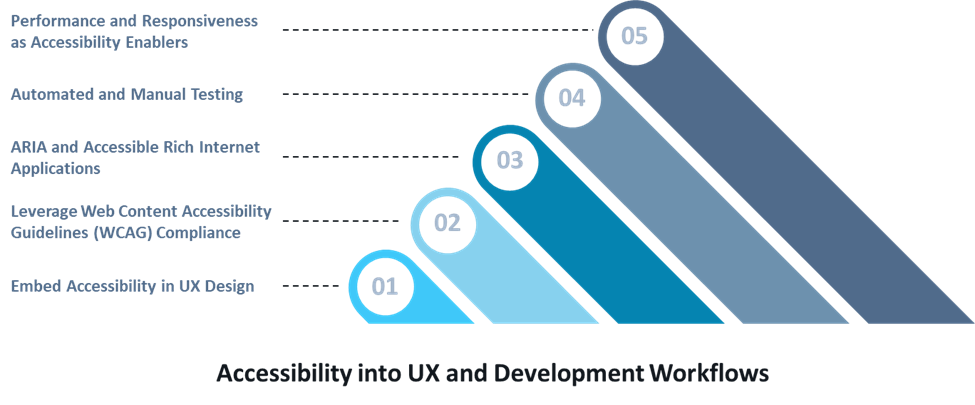
- Embed Accessibility in UX Design:
- Dynamic UI Components: Use WCAG-compliant libraries with ARIA-enhanced elements. For example, aria-live attributes allow screen readers to announce updates in real time.
- Keyboard Navigation and Focus Management: Ensure that keyboard-only users can navigate intuitively. Implement visible focus states that highlight active elements clearly.
- Color Contrast and Readability: High contrast and readable typography are essential. Use tools that simulate color blindness to validate usability for all users.
- Leverage Web Content Accessibility Guidelines (WCAG) Compliance:
Aim for WCAG 2.1 Level AA compliance as a baseline. This includes alt text for images, screen reader labels, and robust form validation for seamless interaction. Utilize tools like Axe, Lighthouse, and WAVE for automated checks integrated into CI/CD pipelines.
- ARIA and Accessible Rich Internet Applications:
ARIA attributes help developers define roles, states, and properties for interactive elements. For example, using
aria-checkedon toggles oraria-expandedon dropdowns enhances assistive technology support. Real-time updates witharia-liveregions keep users informed without page reloads. - Automated and Manual Testing:
- Automated Tools: Integrate tools like Axe and Lighthouse into pipelines for ongoing accessibility checks.
- Manual Testing: Use screen readers (e.g., NVDA, JAWS) and keyboard-only navigation to detect issues automated tools might miss.
- Performance and Responsiveness as Accessibility Enablers:
- Optimize Load Times: Compress images, use lazy loading, and ensure responsive layouts for users on low bandwidth or mobile devices.
Business Value of Web Accessibility
Building accessible digital spaces is not only about compliance — it presents strategic advantages for businesses:
- Expanded Reach: Accessibility broadens your audience, making content usable for millions relying on assistive technologies.
- Enhanced SEO: Accessibility practices like text alternatives and structured content improve search visibility and engagement.
- Stronger Brand Reputation: Businesses prioritizing inclusivity are seen as socially responsible, enhancing customer trust.
- Risk Mitigation: Ensuring accessibility reduces legal risks and demonstrates ethical responsibility.
Businesses can enhance digital accessibility through the following strategies:
- Stay Up to Date: Keep pace with evolving accessibility standards and technologies to maintain compliance.
- Test for Accessibility: Regularly test your site using automated tools and manual methods to ensure seamless UX for all users.
- Facilitate Diverse Engagement Methods: Enable interactions via voice commands, keyboard, gestures, and other methods.
By prioritizing these areas, organizations can create digital environments where everyone can participate fully. Achieving true web accessibility promotes inclusivity and equity.
Building a Culture of Accessibility
Achieving accessibility requires ongoing commitment and education within development teams.
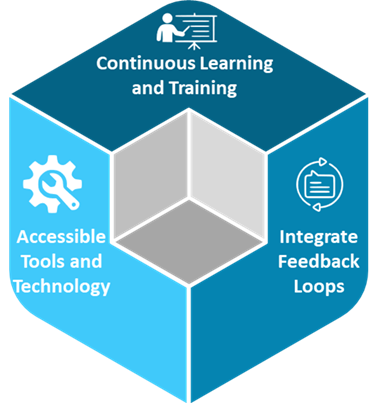
- Continuous Learning and Training: Train design and development teams on accessibility best practices. Partner with experts for audits and workshops to stay aligned with evolving standards.
- Accessible Tools and Technology: Choose frameworks and CMS platforms that support accessibility natively to streamline implementation.
- Integrate Feedback Loops: Collect feedback from users with disabilities to refine accessibility initiatives continuously.
Real-World Examples of Web Accessibility Implementation
Many organizations are setting benchmarks for accessible digital experiences:
- Banks and Financial Institutions: Implement screen reader-compatible websites and secure, accessible interfaces for visually impaired users.
- E-commerce Platforms: Online retailers adopting WCAG guidelines report higher customer satisfaction and retention through smoother navigation.
- Educational Institutions: Schools and universities are deploying accessible learning platforms that support students with disabilities using adaptive technologies.
The Path Forward: Driving Business through Inclusive Technology
As accessibility becomes integral to digital strategy, businesses have the chance to lead with inclusivity. Accessible web solutions not only meet compliance but also expand market reach and elevate UX. Organizations that integrate accessibility into their technology strategies position themselves as pioneers of responsible and innovative design.
By prioritizing accessibility today, businesses ensure sustainable growth, stronger brand reputation, and long-term customer loyalty. Web accessibility is an ongoing commitment that fosters inclusivity and drives meaningful impact.
Calsoft, as a technology-first partner, understands the importance of creating meaningful design that enhances user experience and inclusivity.