
Technology is profoundly changing the world, and to deal with rapid advancement in this arena and outdo competition, businesses need to embrace innovative technologies and solutions. The business environment has digitally transformed operations to stay competitive, innovative, and productive, ultimately boosting revenue. After the COVID-19 pandemic, many enterprises adopted remote working, which required advanced technologies to support distributed teams.
Given the need to move from office to remote environments, enterprises still contemplate choices between application virtualization and desktop virtualization. Application virtualization enables easy delivery of applications on any device, whereas desktop virtualization can mimic the entire workstation. The IT sector faces challenges in providing access to applications and network resources while reducing desktop costs.
The relevant solution is to use a Virtual Desktop Infrastructure (VDI) in place of the traditional desktop environment. Desktop virtualization is a top-tier technology adept at providing high performance, better security, flexibility, and versatility for all enterprises. Remote Desktop Services (RDS) or VDI are key solutions to achieve desktop virtualization.
Virtual Desktop Infrastructure (VDI) and Remote Desktop Services (RDS) (earlier known as Terminal Services) are two widely used IT concepts that are often confused. Although they have similarities, it is important to understand both. Let’s explore desktop virtualization, its key benefits, and a comparison between VDI and RDS.
What is Desktop Virtualization?
Desktop virtualization simulates the user workstation, enabling users to remotely access their desktop from any connected device. This method creates a software-based version of the end-user environment and Operating System (OS), allowing secure remote access regardless of device or OS.
Traditionally, physical desktops and servers were used for daily tasks, with enterprises hosting data on centralized physical servers. Desktop virtualization introduces a digital workspace based on application virtualization, where multiple Virtual Machines (VMs) run on shared physical servers, each with its own OS and software.
There are two main types of desktop virtualization depending on where the OS instance is hosted:
- Local desktop virtualization uses hardware virtualization where processing happens on local hardware. It works best without continuous network connectivity but makes resource sharing difficult.
- Remote desktop virtualization enables remote access to shared computing resources through a client/server model. IT teams control software and desktops hosted on servers either in the cloud or in a data center.
With these capabilities, desktop virtualization improves resource utilization, supports remote workforces, and enhances centralized security. It focuses on identity and access management, allowing users to access only authorized applications and data.
Types of Desktop Virtualization
Desktop virtualization typically comes in three forms: Virtual Desktop Infrastructure (VDI), Remote Desktop Services (RDS), and Desktop-as-a-Service (DaaS).
- VDI: Allows users to remotely access a full desktop OS environment hosted on a centralized server. It uses Remote Desktop Protocol (RDP) to deliver Windows client operating systems, applications, and data from a server-based VM. VDI can be either persistent (one-to-one user mapping) or non-persistent (shared master image).
- RDS: Formerly Terminal Services, allows multiple users to share the same OS and applications running on a central server (RD Session Host). Software installation and updates become easier, and users can access desktops from any computer running RDS.
- DaaS: Hosts VMs on a third-party cloud backend. It supports scalability, flexibility, and pay-per-use pricing, eliminating the need for physical data centers and reducing IT overhead.
VDI vs RDS: Comparison
| Point of Comparison | VDI | RDS |
|---|---|---|
| Number of Users / VM Mapping | 1 User per VM | Multiple users share one Remote Desktop Session Host (RDSH) |
| Overhead | Higher | Lower |
| Architecture | Dedicated and simpler | Shared and complex |
| Cost | Requires more investment in on-premises servers | Lower and easier to self-host |
| Resources Provided | Desktop session and app session via instant clone | App and desktop sessions |
| Benefits |
|
|
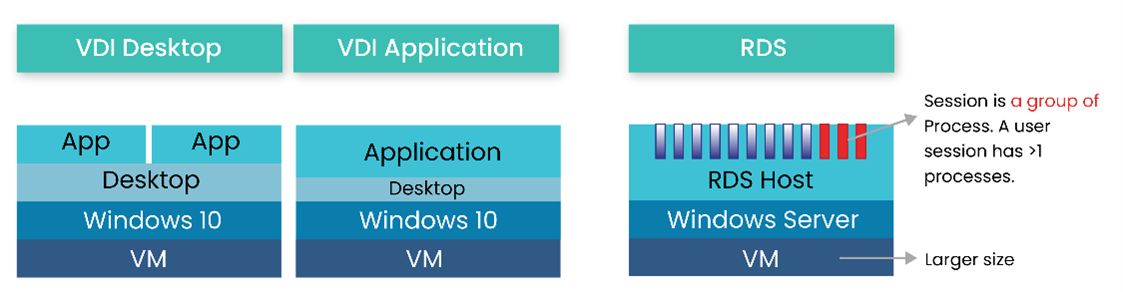
Understanding these differences, let’s look at Figure 1, which illustrates how VDI differs from RDS.
Different Providers of VDI
VMware Horizon View: Provides end users with access to virtual desktops, applications, and services through a single digital workspace.
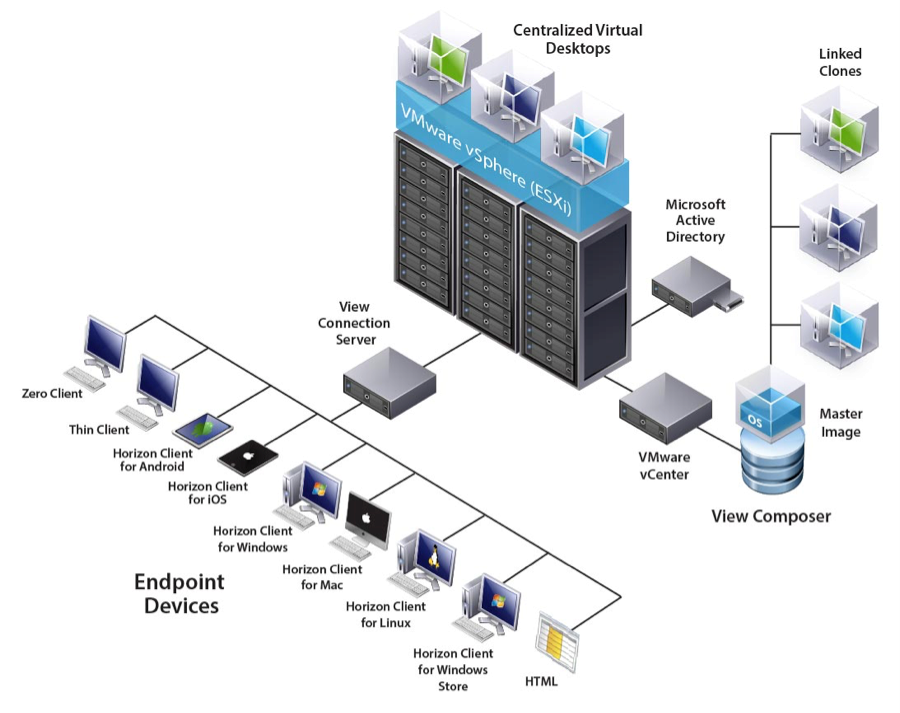
- View Connection Server: Acts as a broker for client connections.
- View Agent: Installed on all guest virtual machines to manage them.
- View Client: Allows users to connect to their desktops via the Connection Server.
- View Client with Local Mode: Supports downloading VMs for local use.
- View Administrator: A web app to configure and manage desktops, authentication, and analytics.
- vCenter Server: Provides centralized management of virtual machines.
- View Composer: Deploys multiple linked-clone desktops from one base image.
- View Transfer Server: Manages and streamlines data transfers between the data center and desktops.
Citrix XenDesktop: A desktop and application virtualization solution developed by Citrix Systems to deliver Windows desktops and apps across virtual infrastructures.
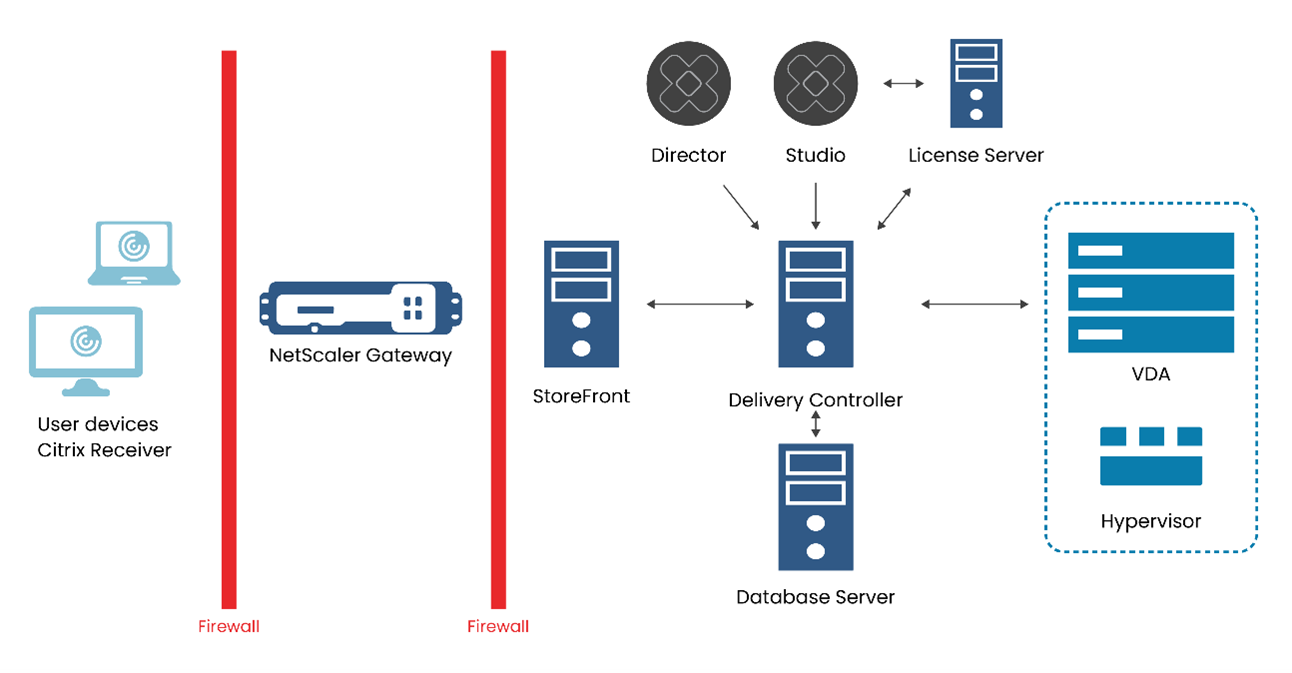
- Delivery Controller: Central management component that controls desktop state and availability.
- Database: Stores configuration and state information.
- Virtual Delivery Agent (VDA): Registers machines and makes resources available to users.
- StoreFront: Authenticates users and manages resource stores.
- Receiver: Installed on endpoints to provide access to Windows, web, and SaaS apps.
- Studio: Management console for configuring and managing deployments.
- Director: Web-based tool for monitoring and troubleshooting environments.
- License Server: Manages Citrix licenses.
- Hypervisor: Hosts virtual machines on dedicated hardware.
Concluding Thoughts
Both RDS and VDI are core components of desktop virtualization and meet different business needs. While VDI provides a more personalized desktop experience, RDS focuses on cost-efficiency and centralized management. Choosing between them depends on specific enterprise requirements.
Calsoft, an early contributor to virtualization technologies, has consistently adopted and implemented the latest innovations for over two decades. Calsoft helps product companies develop next-generation virtualization products using deep expertise in this domain.