

Cyberattacks are rising at an alarming rate in today’s digital era. As cyber threats become increasingly frequent, safeguarding sensitive information has become a major concern for organizations worldwide.
With the growing complexity of the threat landscape and a shortage of trained security professionals, many enterprises are exploring ways to streamline their security operations. Despite increased cybersecurity budgets, organizations struggle to find scalable, cost-effective solutions.
To combat these challenges, organizations are turning to security automation — a pivotal solution that helps safeguard valuable data efficiently and effectively.
This guide explores what security automation is, how it works, its tools, processes, and the benefits it delivers.
What is Security Automation?
Security automation is the process of using software and tools to automatically detect, investigate, and respond to cyber threats. It includes automating system configuration checks, vulnerability scans, monitoring, and incident response.
By automating these repetitive tasks, organizations can minimize human error, accelerate response times, and reduce the risk of security breaches.
Importance of Security Automation
- According to IBM’s Cost of a Data Breach Report, the average total cost of a data breach is $4.35 million. A single cyberattack could potentially cripple a business.
- Gartner predicts that by 2025, 45% of global organizations will be impacted by supply chain attacks.
- Slower detection or remediation times indicate the need to enhance current security practices.
- Analysts overwhelmed with false positives waste valuable time and skills — automation reduces this burden significantly.
A unified security automation solution manages an organization’s entire security operations holistically. Key capabilities include:
- Threat Detection: Automatically identifies potential threats to systems.
- Alert Management: Organizes and prioritizes alerts for faster investigation.
- Automated Response: Executes predefined actions to mitigate and remediate security incidents
Types of Security Automation Tools
Here are the main types of tools that drive security automation in modern enterprises:
1. SOAR (Security Orchestration, Automation, and Response)
SOAR platforms integrate multiple security tools to streamline incident response, improving detection and analysis through coordinated workflows.
2. SIEM (Security Information and Event Management)
SIEM tools collect and analyze security data from various sources to detect anomalies and alert teams about potential threats in real time.
3. EDR (Endpoint Detection and Response) & XDR (Extended Detection and Response)
EDR protects endpoint devices, while XDR extends coverage to networks and other layers of infrastructure using AI-driven detection and automated response mechanisms.
4. RPA (Robotic Process Automation)
RPA automates repetitive, low-level security tasks like scanning for vulnerabilities and collecting monitoring results, improving efficiency.
Core Processes of Security Automation

Most automation tools follow these common stages:
Step 1: Imitate Human Investigation
- Receives alerts from multiple tools.
- Correlates alerts with other data to confirm if they represent real incidents.
Step 2: Determine Responsive Action
Identifies the threat type and chooses the appropriate automated response.
Step 3: Containment and Eradication
- Isolates infected systems from the network.
- Moves malicious files to quarantine zones.
- Executes antivirus or remediation tools automatically.
Step 4: Ticket Management
- Evaluates whether automated actions resolved the issue.
- Alerts human analysts if additional action is needed.
- Generates detailed incident reports.
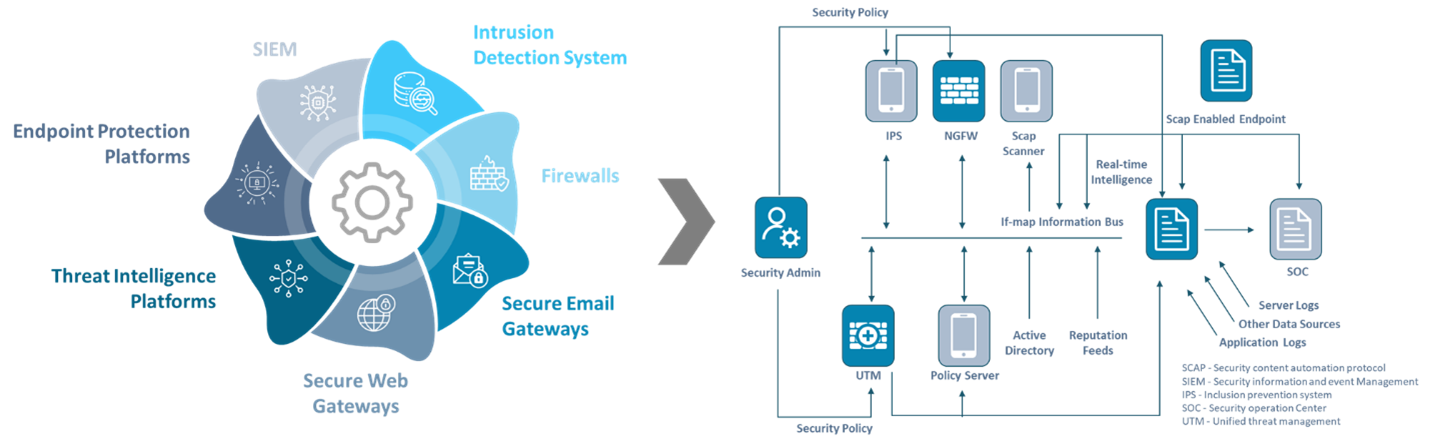
What Security Processes Can Be Automated?
| Security Process | How Does Automation Help? |
|---|---|
| Threat Hunting | Speeds up detection without manual intervention in complex environments. |
| Security Incident Response | Improves detection and accelerates response efficiency. |
| Endpoint Protection (EPP) | Automatically detects and mitigates endpoint threats. |
Security Automation Use Cases
| Use Case | Description |
|---|---|
| Automatic Endpoint Scans | Automates endpoint scanning to quickly detect and respond to threats. |
| Automatic Testing Code Generation | Generates test scripts automatically to improve security testing coverage. |
| Security Automation Rule Updates | Automatically updates rules when migrating workloads across environments. |
Implementing Security Automation Successfully
1. Identify Your Needs
Define how automation can address your organization’s unique security challenges based on your industry and existing systems.
2. Consult with Your Team
- Evaluate alert volumes and response times.
- Identify repetitive tasks suitable for automation.
3. Define Use Cases
List automation use cases relevant to your industry (e.g., healthcare — automated patient data monitoring).
4. Evaluate Providers
- Choose tools that require minimal coding and integrate easily.
- Ensure compatibility with your existing infrastructure.
- Prefer cloud-based, scalable solutions.
Benefits of Security Automation
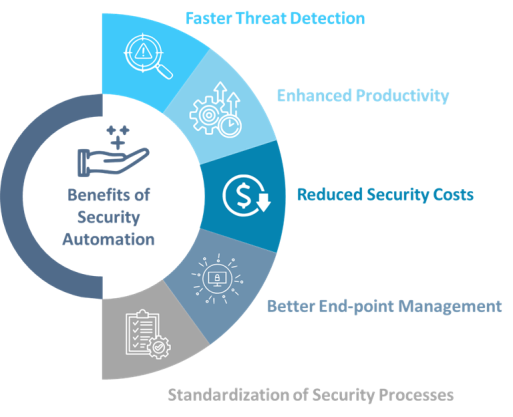
1. Faster Threat Detection
Automation prioritizes real threats, reducing alert fatigue and accelerating detection.
2. Improved Productivity
Frees analysts to focus on critical tasks, enhancing efficiency across SOC teams.
3. Standardized Processes
Ensures consistent security workflows and clearer incident management procedures.
4. Reduced Security Costs
Eliminates repetitive manual work and optimizes resource allocation.
5. Better Endpoint Management
Enhances visibility and protection of endpoints, reducing potential attack surfaces.
Challenges Addressed by Security Automation
| Challenge | Description | How Automation Helps |
|---|---|---|
| Manual Security Processes | Time-consuming and error-prone. | Automates alert triage and response, improving accuracy. |
| Lack of Visibility | Security tools operate in silos, increasing costs. | Provides unified views and streamlines workflows. |
| Compliance Complexity | Manual audits are slow and inconsistent. | Automates compliance reporting and documentation. |
Best Practices for Implementing Security Automation
- Prioritize Automation: Start with frequent and repetitive security tasks.
- Manual Playbooks: Document processes before automating for consistency.
- Adopt Gradually: Begin with smaller workflows, then expand.
- Invest in Training: Educate teams on automation tools, escalation protocols, and best practices.
Conclusion
Security automation has become indispensable for modern cybersecurity strategies. With evolving cyber threats and talent shortages, automation ensures resilience, efficiency, and consistency in defending digital assets.
Calsoft’s security solutions and expert consultants help organizations assess, implement, and optimize AI/ML-driven cybersecurity automation frameworks tailored to their needs.