

With the cloud, individuals and small businesses can easily access advanced services without the need for expensive hardware. It’s like having powerful IT tools available instantly, regardless of your business size.
Virtualization networks play a crucial role in this process. They allow multiple virtual networks to run on the same physical infrastructure, offering flexibility, scalability, and optimized resource utilization.
Understanding virtualization networks is essential to managing cloud environments effectively. They help reduce costs, improve scalability, and enhance performance.
This article explores virtualization networks—their benefits, challenges, and best practices. Let’s get started!
What is a Virtualization Network in Cloud Computing?
A virtualization network separates network resources from physical hardware. Using software, you can create virtual networks that run independently while sharing the same physical infrastructure.
This flexibility is fundamental to cloud computing—it enables quick creation, modification, and management of networks without requiring additional hardware.
Originally, networking depended on physical devices, which were rigid and difficult to manage. As cloud computing expanded, flexible solutions emerged, leading to technologies like NFV (Network Functions Virtualization) and SDN (Software-Defined Networking).
Difference Between NFV and SDN
| Feature | NFV (Network Functions Virtualization) | SDN (Software-Defined Networking) |
|---|---|---|
| Purpose | Virtualizes network functions like routing, firewalls, and load balancing | Centralizes network control and traffic management |
| Function | Runs network functions as software on standard hardware | Separates network control plane from data plane |
| Hardware Dependency | Reduces the need for specialized hardware | Minimizes reliance on traditional networking hardware |
| Scalability | Scales specific network functions as needed | Offers flexible and dynamic network management |
| Flexibility | Enables quick deployment of network services | Allows dynamic adjustment of configurations |
| Implementation Focus | Focuses on virtualizing individual network functions | Focuses on overall network architecture and control |
Different Types of Network Virtualization
Network virtualization can be classified into two primary types: External and Internal Network Virtualization.
External Network Virtualization: Combines or divides multiple physical networks into virtual networks for simplified management in large-scale environments.
Internal Network Virtualization: Operates within a single host, using virtual machines or containers to simulate a network environment and optimize internal performance.
Comparison: External vs. Internal Network Virtualization
| Feature | External Network Virtualization | Internal Network Virtualization |
|---|---|---|
| Scope | Combines or segments multiple physical networks | Operates within a single server |
| Purpose | Simplifies management of large network environments | Optimizes performance within a single host |
| Example Use | Virtual LANs (VLANs) in large data centers | VMs communicating within one server |
| Management Focus | Centralized control of multiple networks | Internal efficiency and workload isolation |
| Complexity | Higher, involves multiple networks | Lower, confined to one host |
How Virtualization Network Works
Virtualization networks decouple network services from hardware, allowing flexible management of network resources. Virtual versions of components like switches and routers are integrated into a software-controlled layer.
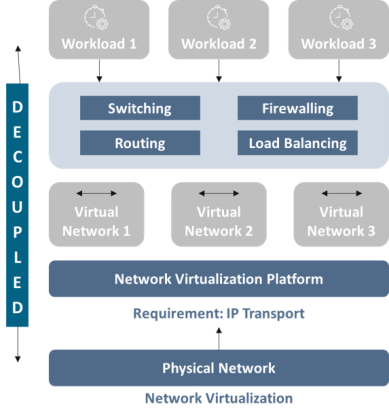
- Network Hypervisor: Abstracts physical hardware and manages virtual networks.
- Virtual Switches and Routers: Manage communication between virtual machines and networks.
- Host Protocols (e.g., VXLAN): Encapsulate traffic, allowing VMs on separate hosts to act as if they’re on the same network.
- Controller Software: Centralizes configuration, policies, and performance optimization.
- Management Tools: Provide dashboards for monitoring, analytics, and automation.
Abstraction Layer and Network Hypervisor
The hypervisor creates an abstraction layer that isolates virtual networks, ensuring each has optimal resources and security without interference.
Resource Control and Bandwidth Management
The hypervisor manages bandwidth distribution and prioritization, ensuring fair resource allocation and preventing network congestion.
Security and Isolation
Network virtualization improves security by isolating networks and using micro-segmentation to reduce attack surfaces.
- Micro-segmentation
- Virtual firewalls
- Intrusion detection systems (IDS)
- Network access control (NAC)
Communication within Virtual Networks
Virtual switches and routers direct data between VMs and across hosts using encapsulation protocols like VXLAN, crucial for large-scale cloud operations.
Challenges of Network Virtualization
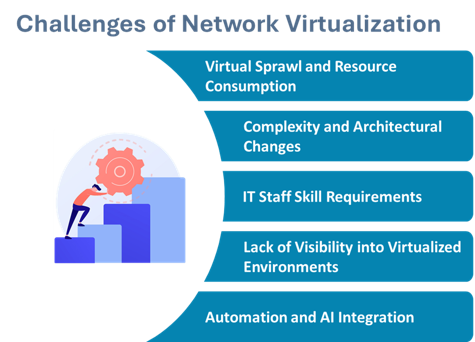
- Virtual Sprawl: Overprovisioning virtual networks increases costs and complexity.
- Complexity and Architecture Changes: Requires new skills, tools, and infrastructure redesign.
- Skill Requirements: IT teams need training on virtualization technologies.
- Lack of Visibility: Traditional monitoring tools are limited in virtual environments.
- Automation and AI Integration: While beneficial, integration can be challenging due to compatibility issues.
Best Practices for Virtualization Network Implementation
Planning and Assessment
- Resource Evaluation: Assess current infrastructure and readiness.
- Define Goals: Establish measurable objectives.
- Risk Mitigation: Develop strategies for anticipated challenges.
Integration with Existing Systems
- Ensure compatibility between old and new systems.
- Adopt phased integration to reduce disruptions.
- Upgrade or replace outdated components when needed.
Monitoring and Optimization
- Use advanced monitoring tools for real-time visibility.
- Review configurations periodically to optimize performance.
- Maintain security vigilance to mitigate emerging threats.
Importance and Use Cases of Virtualization Network in Cloud Computing
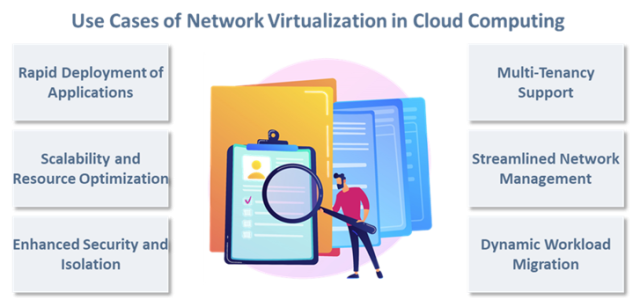
- Enables multi-tenancy and isolated environments for multiple clients.
- Supports dynamic workload migration across the cloud.
- Improves disaster recovery through quick replication and restoration.
- Automates provisioning and reduces deployment time.
- Enhances performance with optimized traffic flow.
- Supports hybrid cloud management with consistent control.
- Reduces energy consumption and promotes sustainability.
Conclusion
Network virtualization delivers flexibility, scalability, and security while reducing operational costs. It enables organizations to scale quickly, centralize control, and optimize resources efficiently.
With over 25 years of experience, Calsoft offers network virtualization services that enhance performance and scalability. Calsoft helps global ISVs design, build, and manage virtualized environments for optimized cloud performance.