
In today’s fast-paced digital world where data drives success, storage boxes form the backbone of enterprise data management. They ensure that vast amounts of information are stored securely and accessed easily. These devices — from external hard drives to complex Network-Attached Storage (NAS) systems — are essential for business continuity and operational efficiency. Their reliability and performance directly depend on the thoroughness of hardware and firmware testing.
Hardware and firmware testing of storage boxes are among the most important practices to ensure that devices perform securely and efficiently. Without effective testing, businesses risk data loss, downtime, and potential security breaches. This blog highlights each step involved in the testing process, ensuring that your storage solutions remain robust and optimized.
Whether you’re an IT professional responsible for maintaining organizational data or a tech enthusiast eager to learn about storage systems, this guide walks you through the essential processes and tools for testing storage boxes effectively.
Importance of Hardware and Firmware Testing
Rigorous hardware and firmware testing are vital for maintaining reliability, performance, and security. Testing ensures components work correctly under various conditions, helping prevent data loss and safeguarding business operations.
Effective testing also enhances performance by diagnosing bottlenecks and optimizing data handling. This is especially critical where high-speed access and processing are essential. Additionally, regular testing identifies vulnerabilities before attackers can exploit them — ensuring compliance with data protection standards.
Hardware Testing
Hardware testing evaluates the functionality, stability, and reliability of physical components. It includes stress tests for CPU, memory, and other key modules to ensure durability under heavy workloads.
As hardware becomes more complex, testing methods must evolve to match modern standards. Commonly tested components include BIOS, CPU, and processors — all verified for logical correctness and adherence to performance benchmarks.
- Software-Based Self-Testing (SBST): Tests microprocessors using their instruction sets during normal operation, offering fast, built-in validation without external hardware.
- Automatic Test Pattern Generation (ATPG): Uses scan chains to partition chip designs into testable blocks, generating vectors automatically for improved fault coverage.
- Built-In Self-Test (BIST): Integrates testing directly within the device, using scan architectures that eliminate the need for expensive external testers.
Common Hardware Testing Tools
- Automatic Test Equipment (ATE)
- SiSoftware Sandra Lite
- Bonnie++
- IOZone
- Netpipe
- Linpack
- NFS Connectathon Package
Hardware Testing Process
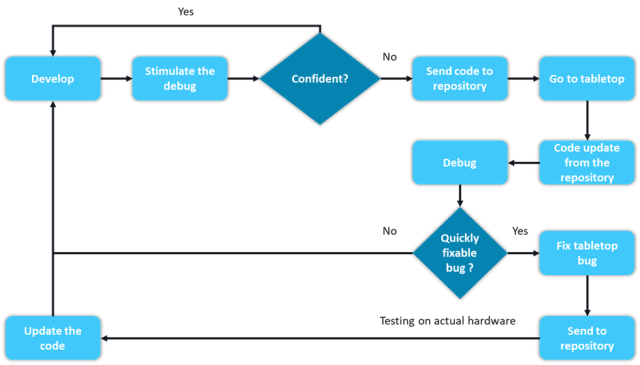
Hardware testing for a storage box involves multiple steps to ensure reliability and performance:
- Visual Inspection: Check for visible damage or wear on drives, controllers, and power supplies.
- Basic Functionality Tests: Power up the system, verify startup sequences, and test connectivity.
- Performance Testing: Measure read/write speeds and IOPS benchmarks to validate system throughput.
- Stress Testing: Run high-load scenarios to identify weaknesses under prolonged use.
- Error Handling: Simulate component failures to verify data recovery and system stability.
Firmware Testing
Firmware is embedded software that controls and monitors hardware systems, ensuring low-level operations run smoothly. Devices like embedded systems, computers, and peripherals depend on it for core functionality.
Firmware testing verifies that systems meet functional, performance, and reliability requirements. As firmware evolves, its complexity increases — demanding thorough validation to minimize risk and improve stability.
- Testing at the microprogram level — analyzing complete code or system states after execution.
- Testing at the microinstruction level — verifying instruction assignments and execution outcomes.
- Testing at the micro-operation level — monitoring execution of individual operations.
Popular Firmware Testing Tools
- FWTS (Firmware Test Suite): A Linux utility that automates firmware testing, covering ACPI, UEFI, and hardware configuration validation.
Firmware Testing Process for Storage Boxes
- Version Verification: Ensure firmware matches the latest stable release to prevent compatibility issues.
- Functionality Testing: Validate RAID configurations, read/write operations, and fault handling.
- Performance Testing: Benchmark data throughput and responsiveness under firmware influence.
- Security Testing: Scan for vulnerabilities, confirm secure boot, and check encryption integrity.
- Upgrade/Downgrade Testing: Test seamless firmware update and rollback procedures without system disruption.
This structured approach guarantees that firmware operates reliably, securely, and efficiently alongside hardware.
Conclusion
Hardware testing is complex — involving inspection, performance benchmarking, and stress evaluation under various conditions to ensure durability and reliability. Firmware testing, on the other hand, focuses on coordination between software and hardware layers, demanding simulation, debugging, and co-validation. Together, these processes ensure system robustness and long-term stability.
Calsoft has been a pioneer in managed testing services, leveraging advanced tools and frameworks to help enterprises accelerate their digital transformation journeys.
Below are references and open-source tools to streamline your testing workflow:
- UEFI (Unified Extensible Firmware Interface): Defines the interface between operating systems and firmware, ensuring standardized booting environments.
- FWTS (Firmware Test Suite): Checks BIOS and ACPI errors, providing actionable insights for debugging.
- CHIPSEC: A platform security framework analyzing hardware, BIOS/UEFI, and system components across Windows, Linux, and macOS.
- Intel UEFI Debugger Tool: Enables firmware debugging and validation for UDK-based builds.
- Greentea: Automates embedded OS testing in local and CI environments.
- Nanotest: Provides built-in diagnostics and self-test frameworks for microcontrollers.
- gperftools: Google’s performance toolkit with thread-safe profilers and memory checkers.
- linux-uefi-validation (LUV): Unified framework combining multiple firmware test suites for Linux validation.
- op-test-framework: Automates OpenPower system testing, including power cycling and boot validation.
- ARM Trusted Firmware: Reference implementation for secure-world software on ARMv8-A platforms.
- LPS Node Firmware: Firmware for Local Positioning System nodes.
- dns323-firmware-tools: Tools for bundling and uploading custom firmware images.
- Crazyflie Firmware: Source code for Crazyflie 1.0/2.0 quadcopter firmware.
- Binwalk: Tool for reverse-engineering and analyzing firmware images.
- Phantom Firmware Tools: Extract, modify, and repackage DJI Phantom 3 firmware.
- NXP Test and Tool Utility: Windows-based testing interface for NXP hardware platforms.
- HP StorageWorks Library & Tape Tools: Diagnostics for HP’s tape and optical storage devices.
- IBM Tape Diagnostic Tool (ITDT): Performs diagnostics, updates, and performance tests for IBM storage drives.
- Secure Boot Manual Logo Test: Verifies UEFI secure boot and image authentication processes.