

VMware vCenter Server is one of the most powerful tools in VMware’s portfolio, enabling seamless management of virtualized environments. Among its most useful features are vCenter plugins, which extend core functionalities by integrating third-party systems for unified management, system discovery, and provisioning.
In essence, vCenter Plugins can be built using two different architectures: Local Plugin Architecture and Remote Plugin Architecture. Let’s decode both below.
Decoding the vCenter Plugin Architectures
VMware vCenter plugins are designed to enhance vCenter Server’s functionality. There are two architectural models used for building plugins — Local and Remote. Each serves a specific purpose depending on scalability, compatibility, and VMware’s certification guidelines.
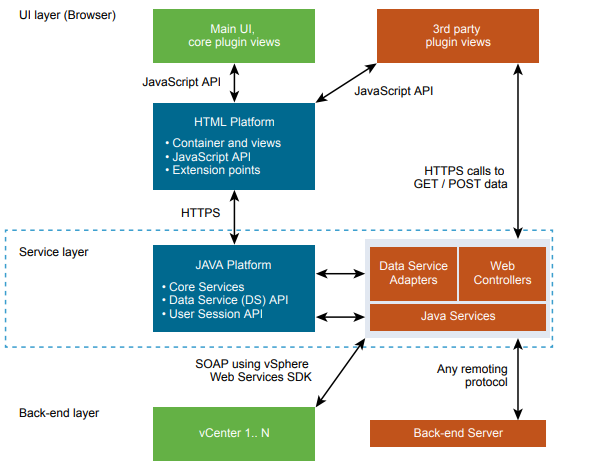
Local Plugin Architecture (Legacy)
In the Local Plugin Architecture, the plugin is tightly integrated and hosted directly on the vCenter Server. Introduced with vSphere 6.5 and supported through vSphere 6.7 and 7.0, this approach embeds the plugin within the same vCenter instance.
However, VMware announced that starting from vSphere 7.0, local plugins would no longer receive new features and would eventually be deprecated and excluded from VMware’s certification program.
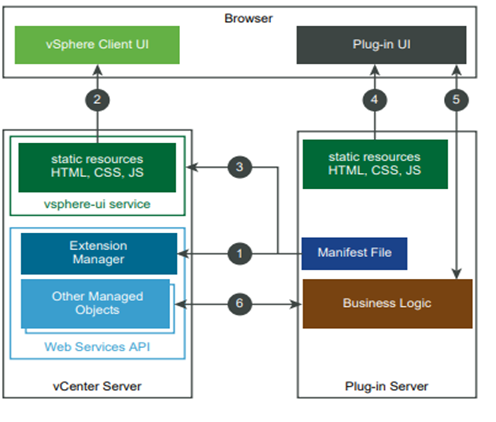
Remote Plugin Architecture
The Remote Plugin Architecture, introduced with vSphere 6.7 U1, offers a more modular and scalable approach. Here, the plugin and vCenter Server are hosted on separate servers, reducing dependency and improving flexibility. VMware has confirmed that this architecture will be the only supported model in future vSphere releases.
Advantages of Remote vCenter Plugin Architecture
Transitioning from a local to a remote vCenter plugin model provides several major advantages:
- Enhanced vCenter Stability: Decoupling plugins from vCenter improves overall stability, ensuring that plugin issues do not impact the core system.
- Independence from vCenter Upgrades: Remote plugins eliminate compatibility concerns during vCenter upgrades, allowing administrators to update independently.
- Streamlined Troubleshooting: Hosting the plugin separately enables easier diagnosis and resolution of plugin-specific issues, minimizing downtime.
- Multiple Instances and Versions: Remote plugins support the deployment of multiple plugin instances or different versions simultaneously, improving flexibility.
- Improved Security, Performance, and Scalability: Isolating the plugin reduces vCenter’s attack surface and enhances performance through distributed workloads.
- Cloud Compatibility: Remote plugins integrate seamlessly with VMware-supported clouds, such as VMware Cloud on AWS, ensuring consistent operations across hybrid environments.
How Calsoft Can Help
Calsoft, a leading product engineering services company, has deep expertise in VMware ecosystems and plugin development. Our experience spans across multiple VMware solutions, including:
- Local and Remote vCenter Plugins
- vROps Management Packs
- vRLI Content Packs
- vRO Plugins
- SRM/SRA Adapters
Calsoft assists ISVs, Service Providers, and Enterprises in the following ways:
- Migrating from Local to Remote Plugins: We help organizations transition smoothly from local plugins to modern, scalable remote architectures.
- Developing Remote vCenter Plugins: Our experts can design and build new remote plugins tailored to specific customer requirements and VMware best practices.
- VMware Certification Assistance: Calsoft guides customers through the VMware certification process to ensure compliance and market readiness.
Conclusion
vCenter plugins are critical in extending VMware vCenter Server’s capabilities by enabling smooth integration with third-party systems. The shift from local to remote plugin architecture delivers improved stability, flexibility, and ease of management.
With Calsoft’s deep VMware expertise, organizations can develop, migrate, and certify vCenter plugins efficiently — ensuring their virtualized environments operate at peak performance.
For queries related to vCenter plugins and migration, write to us at marketing@calsoftinc.com.