

When you think about flexible workflows or distributed operations, you often equate these concepts with cloud environments.
Many companies utilized a single vendor in the early days of cloud computing. They acquired services, storage, and computing resources from a solitary Cloud Service Provider (CSP). This was often the only choice an organization had when exploring the power of this new computing paradigm. Today, companies have a wide variety of choices when constructing a cloud environment.
According to Gartner, by 2025, more than 51% of IT spending in critical segments like application software and infrastructure software will shift from traditional, on-premises solutions to the cloud, indicating strong hybrid cloud adoption among enterprises. This shows that businesses are rapidly entering the multi-cloud age. Many business owners want to move to the cloud to improve operational flexibility. However, while cloud technology and flexible operations often go hand in hand, they are not the same — even though they are closely related.
Cloud solutions offer significant advantages, especially for companies looking to streamline their workflows and scale efficiently. However, you must also consider cost, security, and reliability.
Whether you choose the cloud for flexibility, on-premises for control, or hybrid for a mix of both, your selection will influence how your organization scales.
Continue reading to explore cloud, on-premises, and hybrid solutions along with their key advantages and disadvantages.
Understanding Cloud, On-Premises, and Hybrid Solutions
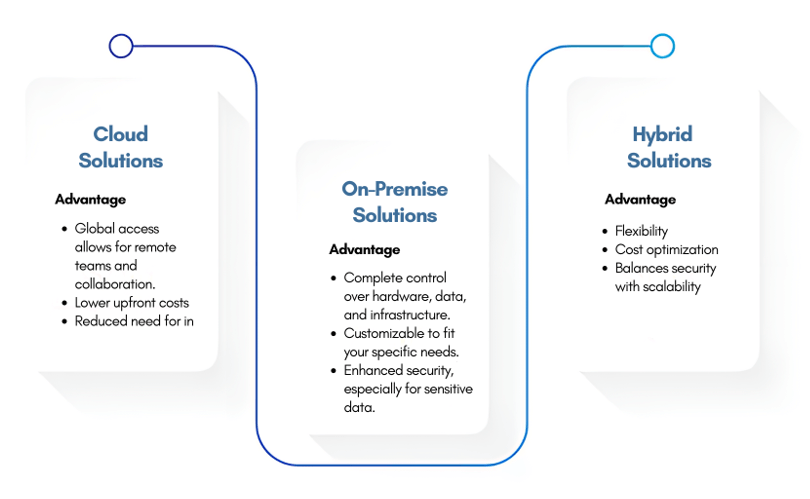
Choosing the right IT infrastructure is not just a technical decision — it’s a strategic move that can define your business’s future. Let’s break down the three main types of IT infrastructure:
Cloud Solutions
Deploying solutions in the cloud means using a network of remote servers hosted in external data centers. Cloud solutions allow you to operate without investing in bulky hardware or maintenance-heavy servers.
Key Advantages
- Easy scalability to match business growth.
- Global access for remote teams and collaboration.
- Lower upfront costs — no physical infrastructure needed.
- Reduced need for in-house IT maintenance.
Key Disadvantages
- Security concerns for sensitive data.
- Complex data compliance across regions.
- Limited control as third-party providers manage systems.
- Dependence on stable internet connectivity.
Use Case: Ideal for businesses needing rapid scalability without managing infrastructure — for instance, Dropbox and Netflix.
On-Premises Solutions
On-premises solutions involve maintaining physical servers or renting exclusive hardware from external data centers. This approach offers control and customization but requires ongoing investment and management.
Key Advantages
- Complete control over hardware, data, and infrastructure.
- High customization based on specific business needs.
- Enhanced security for sensitive data.
Key Disadvantages
- High upfront costs for equipment and space.
- Labor-intensive maintenance and upgrades.
- Limited scalability — expansion requires new hardware.
Use Case: Best suited for industries like government, finance, or healthcare, where data control and compliance are critical.
Hybrid Solutions
Hybrid solutions combine on-premises systems with cloud services, offering flexibility and control. Businesses can store sensitive data on-premises while using cloud resources for scalability and collaboration.
Key Advantages
- Store sensitive data on-premises while scaling with the cloud.
- Cost optimization by using cloud resources only when needed.
- Balance between security and flexibility.
Key Disadvantages
- Complex management across environments.
- Technical challenges in integration.
- Higher maintenance and integration costs.
Use Case: Financial institutions or enterprises with data sensitivity that still require cloud scalability.
Comparative Analysis: Cloud vs On-Premises vs Hybrid Solutions
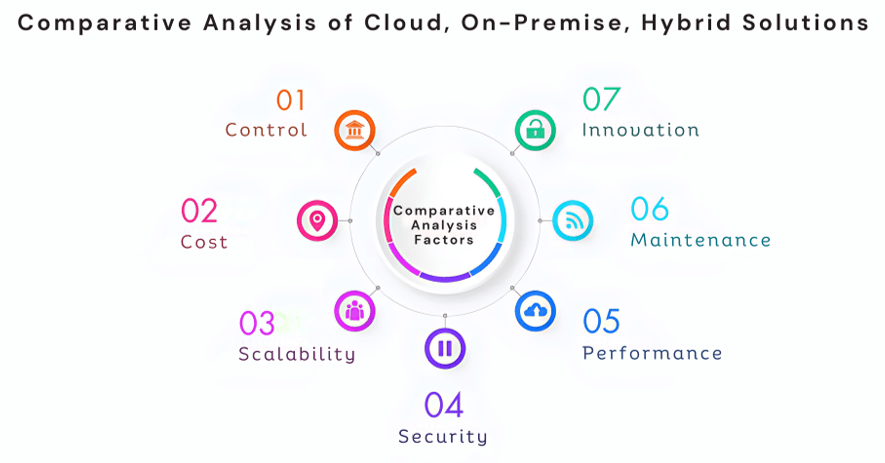
Each infrastructure type has unique advantages and challenges. Here’s a detailed comparison to help you make an informed decision:
| Factor | Cloud Solutions | On-Premises Solutions | Hybrid Solutions |
|---|---|---|---|
| Control | Limited control; managed by provider. | Complete control over data and infrastructure. | Balanced control between cloud and on-premises. |
| Cost | OPEX model — pay-as-you-go. | High CAPEX — upfront investment in hardware. | Mix of CAPEX (on-premises) and OPEX (cloud). |
| Scalability | Highly scalable on demand. | Scaling requires new hardware. | Cloud scalability with on-premises control. |
| Security | Shared responsibility; less direct control. | Full control; ideal for regulated sectors. | Flexible — sensitive data can remain on-premises. |
| Performance | Dependent on internet; potential latency. | High local performance. | Combines local performance with cloud efficiency. |
| Maintenance | Minimal; handled by provider. | High; requires internal IT resources. | Shared maintenance between internal and external teams. |
| Innovation | Rapid adoption of new technologies. | Slower innovation due to hardware dependencies. | Blend of agility and control. |
Factors to Consider When Choosing a Solution
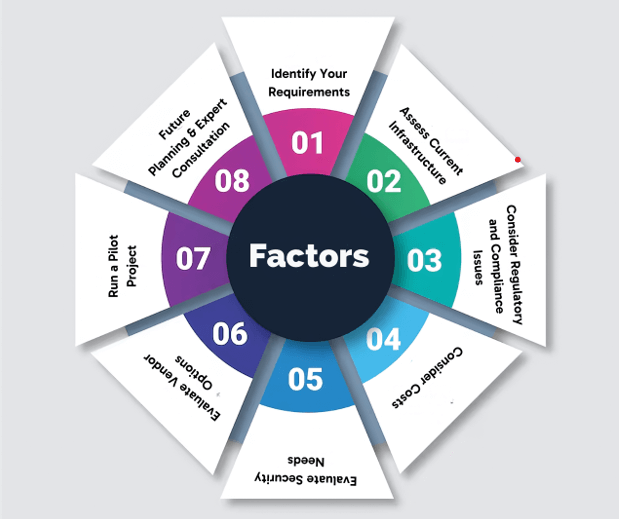
1. Identify Your Requirements
List out your business needs — flexibility, scaling, or security. Identify workloads like sensitive data or global collaboration to determine the right fit.
2. Assess Current Infrastructure
Analyze existing servers, storage, and software. Conduct an IT audit to decide if you should upgrade, migrate, or integrate new solutions.
3. Consider Regulatory and Compliance Issues
Ensure compliance with industry standards like GDPR or HIPAA. Choose infrastructure that supports these regulations.
4. Consider Costs
Compare the Total Cost of Ownership (TCO) for on-premises with the pay-as-you-go model for cloud systems to identify long-term ROI.
5. Evaluate Security Needs
Perform a risk assessment to determine which model provides the best protection and meets your company’s compliance and security requirements.
6. Evaluate Vendor Options
Compare vendors based on SLAs, customer support, scalability, and security certifications before committing.
7. Run a Pilot Project
Test the chosen solution with a small-scale pilot before full deployment to identify compatibility or cost issues.
8. Plan for the Future
Choose a flexible solution that evolves with your business and can integrate with future technologies like AI, ML, and IoT.
9. Consult with Experts
Partner with experienced IT consultants like Calsoft to assess, plan, and implement the best-fit solution for your business needs.
Conclusion
Choosing the right IT infrastructure — cloud, on-premises, or hybrid — defines how your business will operate tomorrow. Your choice is more than technical; it’s strategic. The right system enhances growth, scalability, and innovation while keeping your data secure.
Calsoft leverages 25 years of product engineering expertise to empower businesses with innovative cloud solutions, ensuring seamless connectivity, analytics, and optimized operations for sustainable growth.