
The Information Technology (IT) industry is undergoing a major transformation in infrastructure and operations. Softwarization plays a crucial role in redefining how enterprises view compute, storage, and networking solutions. The introduction of virtualization in Data Centers (DC) marked a paradigm shift for the IT industry. Modernizing DC technologies and applications enables organizations to adopt innovative business models for faster and more efficient service delivery. To support today’s modern applications, enterprises need an agile, scalable, and flexible network infrastructure that ensures reliable connectivity and high-quality service delivery to end users.
Virtualization enhances business efficiency by abstracting workloads from physical hardware. It also brings substantial networking advantages. VMware has been a leader in virtualization technology, and its VMware NSX platform is a powerful solution for network virtualization across data centers, public clouds, and multi-cloud environments.
This blog explores the following key areas:
- What is VMware NSX-V and NSX-T?
- Why migrate from NSX-V to NSX-T?
- The migration process to NSX-T
Before diving into NSX in detail, let’s briefly look at the challenges that existed in traditional data center networking.
Challenges in Traditional Data Center Networking
The concept of a Software-Defined Data Center (SDDC)—which leverages next-generation software-defined networking and virtualization—has enabled enterprises to achieve greater agility and automation in service delivery. These innovations reduce operational complexity, deployment time, and cost. Software-defined networking (SDN) and virtualization technologies allow organizations to virtualize data center infrastructure while benefiting from software-defined storage and automation.
Traditional DC networks were often slow to meet growing enterprise demands due to the following limitations:
- Slow provisioning of routers, switches, and other networking hardware
- Vendor lock-in due to proprietary networking technologies
- Lack of automated network configuration
- High dependency on manual intervention for network changes
- Error-prone changes despite skilled engineering teams
- Rigid network constructs such as VLANs, firewalls, and ACLs limiting DevOps agility
- Limited workload mobility and scalability
By separating network functions from physical infrastructure and placing them in software, enterprises can overcome these challenges. VMware NSX addresses these limitations effectively.
How NSX Works
VMware NSX is a virtual networking and security software product suite built upon intellectual property from VMware’s vCloud Networking and Security (vCNS) and Nicira’s Network Virtualization Platform (NVP).
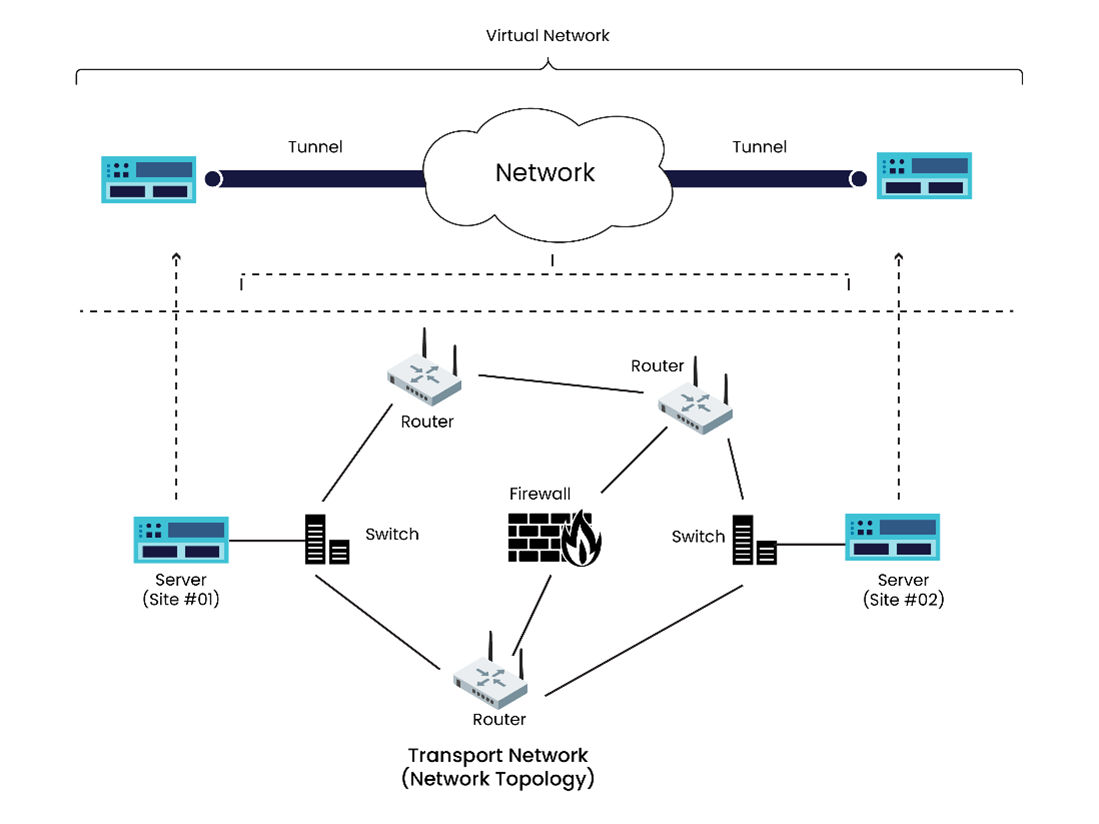
As part of the SDDC framework, NSX virtualizes networking elements such as firewalls, routing, and load balancing. It decouples network operations from physical hardware, reducing the need for routers and switches while enabling seamless migration to cloud environments. NSX supports both underlay and overlay networks:
- Underlay Network: The physical network infrastructure responsible for transmitting packets, including switches, routers, and cabling. It uses Ethernet and routing protocols but lacks flexibility and scalability.
- Overlay Network: A virtual network built on top of the physical infrastructure that enables multiple logical networks to coexist within the same physical network.
VMware offers two major versions of NSX — NSX-V (for vSphere) and NSX-T (Transformers). Let’s explore the key differences and why organizations are transitioning from NSX-V to NSX-T.
NSX-V vs NSX-T
NSX-V is a software-defined networking platform that operates exclusively within a vSphere environment, managed by a vCenter Server. However, as enterprises increasingly migrate workloads to cloud environments, the need for a more flexible solution became apparent. This led to the introduction of VMware NSX-T, which extends support beyond vSphere to multi-cloud and multi-hypervisor environments.
Table 1: Key Differences Between NSX-V and NSX-T
| Feature | NSX-V | NSX-T |
|---|---|---|
| Hypervisor Support | vSphere only | vSphere, OpenStack, Kubernetes, KVM, Docker, AWS |
| Deployment | Only as ESXi VM | As ESXi VM or KVM |
| vCenter Dependency | Required | Independent |
| Overlay Protocol | VXLAN | GENEVE |
| Security | Requires additional products | Built-in advanced security |
| Kubernetes Integration | Not supported | Supported via NSX-T Container Plug-in (NCP) |
| Architecture | Centralized | Distributed |
NSX-T Architecture and Key Components
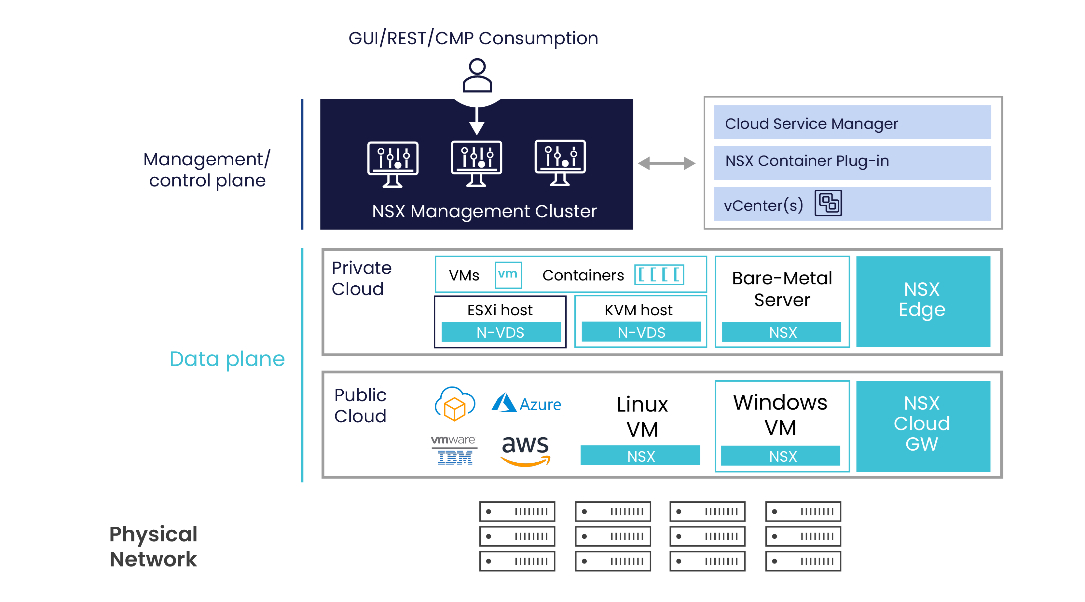
NSX-T features a multi-tiered, cloud-optimized architecture that supports hybrid and multi-cloud environments. The architecture offers high flexibility, scalability, and performance. Key components include:
- NSX Manager: Centralized management, monitoring, and configuration plane.
- NSX Controller: Manages distributed state and logical network programmability.
- NSX Edge: Handles gateway services, routing, VPN, DHCP, and load balancing.
- Distributed Logical Routers/Switches: Enable east-west traffic between workloads.
- Security Components: Distributed firewall, IDS/IPS, and analytics.
Why Enterprises Migrate to NSX-T
NSX-T provides a flexible and agile software-defined networking foundation for multi-cloud environments, enabling IT and development teams to support modern applications. Key advantages include:
- Advanced Federation: Manage multiple NSX installations across data centers.
- Full-Stack Networking: Supports microservices, containers, and multi-tier applications.
- Enhanced Security: AI- and ML-driven NSX Intelligence proactively detects threats.
- Automation: API-driven automation for streamlined network management.
- Improved Monitoring: Intuitive dashboards and analytics for better insights.
Migration Process from NSX-V to NSX-T
Before migration, the network should be thoroughly analyzed to ensure compatibility and readiness. The process typically begins with an NSX V2T Migration Assessment, which evaluates the current NSX-V environment and defines the future NSX-T architecture.
VMware’s Professional Services team analyzes parameters such as:
- Number of data centers and hosts
- Security policies, firewalls, and segmentation
- Third-party integrations and VMware software dependencies
- Routing, NAT, BGP, OSPF, and load balancing configurations
Migration Steps:
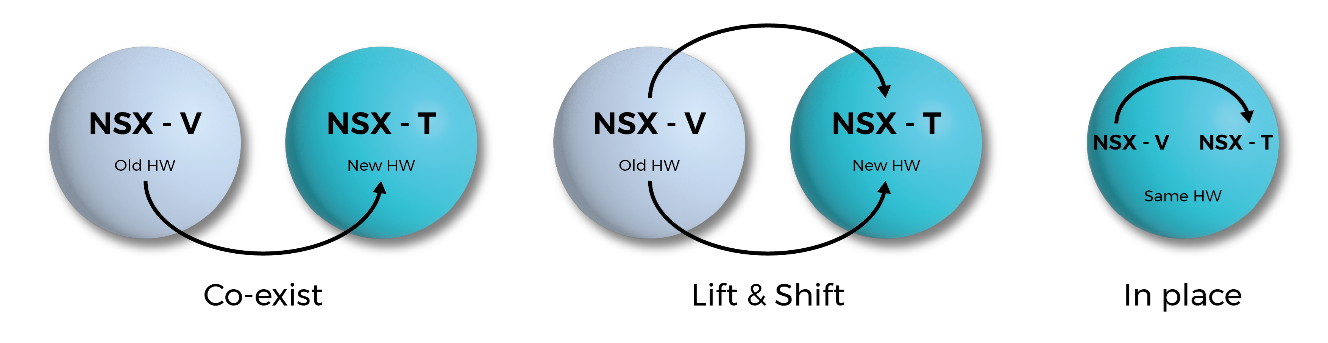
- Analyze current NSX-V setup, documenting configurations and integrations.
- Set up NSX-T sandbox for testing and validation.
- Develop a migration plan minimizing downtime.
- Deploy NSX-T alongside NSX-V.
- Migrate applications tier by tier to NSX-T.
- Decommission NSX-V components post-migration.
- Optimize and monitor NSX-T performance and security.
Calsoft has been a proud primary contributor to the design and development of VMware’s NSX Migration Tool. With over two decades of expertise in VMware technologies, Calsoft is the preferred partner for NSX-V to NSX-T migrations.
Key Benefits of Partnering with Calsoft
- VMware-preferred NSX migration partner with certified engineers
- Faster and more secure migrations with reduced complexity
- Seamless migration of policies and firewall rules
- Dedicated NSX migration lab and 24/7 support
- Comprehensive assessment and custom migration plans
In a Nutshell
VMware NSX empowers enterprises to shift from traditional networking to a software-defined, virtualized model. This transition improves scalability, flexibility, and efficiency while reducing costs and deployment time. With VMware (by Broadcom) naming Calsoft as the maintainer of NSX-V to NSX-T migration for vCD workloads, Calsoft remains the partner of choice for enterprises seeking seamless NSX workload migrations.